






Published: April 24, 2026
What Is Purchase Order Software and How Does It Work?
Handling the procurement cycle for businesses through exhausting spreadsheets, paperwork, and emails is an overwhelming task, which leads to multiple errors and a hike in unnecessary costs. As the business expands its network and sales, handling thousands of purchase requests becomes difficult without automation. Therefore, implementing a cutting-edge and reliable purchase order management software simplifies and speeds up the process of the procurement cycle.
A purchase order software assist business in automating, tracking, approving, and managing the entire purchase order process. It gives an upper hand by improving the feasibility and ensuring smooth control over business spending. For business, incorporating PO software into ERP or an inventory system eliminates major hurdles and provides real-time insights. For better understanding, we have provided you with a comprehensive guide to purchase order management software and its key features, benefits, and how it works.
What Is Purchase Order Management Software?
Purchase order management software is a powerful and digital software helping businesses to create, manage, and track every single step processed during purchase orders.
A purchase order (PO) is a formal document sent by a buyer to a supplier specifying:
- Products or services required
- Quantity
- Agreed pricing
- Delivery terms
- Payment conditions
Why Is Purchase Order Management Software Important?
As we all know, the manual process of procurement can be a challenging task. Therefore, it becomes a priority for businesses to equip top-quality and best purchase border management software, which helps in managing and eliminating the problems like
- Approval delays
- Duplicate purchases
- Data entry mistakes
- Poor spend visibility
- Budget overruns
- Lost documents
- Supplier communication gaps
How Does Purchase Order Management Software Work?
Purchase order software typically follows a structured workflow once integrated into the ERP system to handle the entire procurement cycle.
- Purchase Requisition Submission: A department or employee can simply raise the purchase requisition (PR) within the software.
- Product/service details
- Quantity required
- Preferred supplier
- Budget code
- Required delivery date
- Automated Approval Workflow: The software directs the raised PR to the desired and relevant approver, which is based on preset rules such as:
- Department
- Purchase amount
- Budget threshold
- Procurement policies
- Purchase Order Creation: Once the raised PR is approved, the tool automatically generates the professional purchase order with:
- Unique PO number
- Supplier information
- Item specifications
- Pricing and taxes
- Delivery instructions
- Payment terms
- PO Dispatch to Supplier: The software precisely sends the PO directly to the supplier through:
- Vendor Portal
- EDI/API Integration
- Order Tracking and Status Monitoring: The business can easily monitor and track the purchase order progress in real-time
- Sent
- Confirmed
- In Transit
- Delivered
- Partially Fulfilled
- Delayed
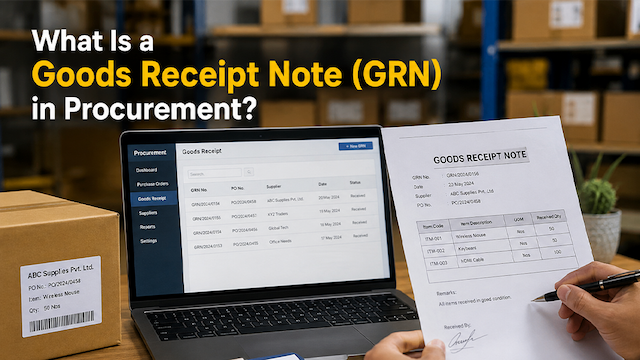
- Goods Receipt Recording: When goods/services are received, the warehouse or receiving team's log:
- Quantity received
- Damaged items
- Partial shipments
- Delivery date
- Invoice Matching and Payment: The software performs 3-way matching between:
- Purchase Order
- Goods Receipt Note (GRN)
- Supplier Invoice
- Reporting and Audit Trail: Every PO action is recorded for:
- Audit compliance
- Spend analysis
- Vendor performance review
- Procurement optimization
Key Features of Purchase Order Management Software
There are multiple features of the PO management tool that help in sveeral ways. Let's have a quick look at them:
Automated PO Creation
Purchase order management software automatically generates purchase orders using pre-configured templates, supplier data, and item catalogs. This eliminates repetitive manual data entry and ensures every PO follows a standardized format. It also reduces creation time and improves documentation accuracy.
Approval Workflow Automation
The software routes purchase requests through predefined approval hierarchies based on department, purchase value, or business rules. Approvers receive instant notifications and can approve or reject requests digitally. This speeds up procurement cycles while ensuring policy compliance.
A centralized supplier database stores vendor profiles, pricing agreements, contracts, contact details, and performance records. Procurement teams can easily compare vendors and select preferred suppliers. This helps improve supplier relationships and sourcing decisions.
Real-Time Order Tracking
Users can monitor the live status of every purchase order from creation to fulfillment. The software tracks whether the PO is approved, sent, acknowledged, shipped, or delivered. This visibility helps teams proactively manage delays and supplier performance.
Budget Control
The software checks purchase requests against department or project budgets before approval. It can automatically flag overspend or block purchases exceeding allocated limits. This helps organizations maintain tighter financial discipline and avoid budget overruns.
Inventory Integration
When goods are received, the system automatically updates stock levels in the inventory database. This ensures real-time inventory visibility across warehouses and departments. It also helps procurement teams make smarter replenishment decisions.
Invoice Matching
The software performs automated three-way matching between the purchase order, goods receipt note (GRN), and supplier invoice. Discrepancies are flagged instantly for review before payment processing. This reduces payment errors and prevents fraudulent invoicing.
Reporting & Analytics
Advanced dashboards provide insights into procurement spending, supplier performance, approval turnaround times, and purchasing trends. Businesses can use these reports to identify inefficiencies and optimize procurement strategies. Data-driven insights support better decision-making.
Benefits of Purchase Order Management Software
Integration of purchase order management software has multiple benefits, which include:
- Improved Procurement Efficiency: By automating manual procurement tasks such as PO creation, approvals, and recordkeeping, the software significantly reduces administrative workload. Teams can process purchases faster with fewer delays. This leads to more efficient procurement operations.
- Better Spend Control: The software provides complete visibility into procurement spending and enforces budget controls at every stage. It prevents unauthorized purchases and duplicate orders through approval workflows and tracking. This ensures disciplined spending management.
- Faster Approvals: Digital approval workflows route requests instantly to the appropriate approvers without paperwork or email chains. Managers can approve orders remotely from any device. This accelerates procurement timelines and reduces bottlenecks.
- Reduced Errors: Automation minimizes human errors caused by manual data entry, incorrect pricing, or missing documentation. Standardized templates and validation checks improve accuracy throughout the purchasing process. This reduces costly procurement mistakes.
- Stronger Supplier Relationships: Clear purchase documentation, accurate order details, and timely communication improve collaboration with suppliers. Suppliers receive orders faster and can fulfill them more efficiently. This strengthens long-term vendor relationships.
- Enhanced Audit Readiness: Every procurement transaction is logged with timestamps, approvals, and document history for complete traceability. Businesses can quickly retrieve records during audits or compliance checks. This simplifies regulatory and financial reporting.
- Inventory Optimization: Integration with inventory systems allows procurement teams to purchase based on real-time stock levels. This prevents overstocking and reduces the risk of stockouts. Businesses can maintain optimal inventory without tying up excess capital.
Manual PO Management vs PO Management Software
Aspect | Manual Process | PO Management Software |
Approval Time | Slow | Automated & Fast |
Error Rate | High | Low |
Document Storage | Paper/Scattered | Centralized Digital |
Spend Visibility | Limited | Real-Time |
Audit Trail | Difficult | Automatic |
Supplier Tracking | Manual Follow-up | Live Tracking |
Scalability | Poor | High |
How to Choose the Right Purchase Order Management Software?
When selecting a solution, consider:
- Ease of use
- ERP/accounting integration
- Custom approval workflows
- Mobile accessibility
- Reporting capabilities
- Supplier portal functionality
- Multi-location support
- Security and compliance features
- Scalability for future growth
Final Thoughts
Purchase Order Management Software is an essential tool for modern businesses looking to streamline procurement, reduce operational inefficiencies, and maintain tighter control over organizational spending. Automating the complete purchase order lifecycle, from requisition and approval to invoice matching and payment, helps businesses improve procurement speed, accuracy, compliance, and supplier collaboration. If you are looking to integrate this remarkable tool, you can partner with Cognilix. They have a wide range of software that simplifies the overall procurement process, which includes the S2P source to pay platform, vendor management software, and Data Governance and RFQ analytics.
So, whether you are a small business managing limited purchases or a large enterprise handling complex procurement operations, investing in the right PO management software can significantly improve operational efficiency and financial oversight.